

I want to start with the part most reviews bury at the bottom: this cooling pad will not turn a genuinely hot laptop into a cool one. If that's what you're expecting for 30 dollars, save yourself the disappointment now. What it will do, and what mine has done since I bought it in March for a ThinkPad that runs a discrete graphics chip most laptops in this price range don't have, is keep the worst of the heat from turning every afternoon call into a small crisis. That's a narrower promise than the marketing copy makes, and it's the honest one.
I run a two-person project coordination business out of a converted garage, which means no central air, a space heater in winter, and a room that regularly hits 80 degrees by early afternoon in summer. My ThinkPad was already a hot-running machine before I added anything to the mix. I'd gone through two previous cooling pads before this one, both from brands I won't bother naming because they died within eight weeks. So when I say this review comes with a healthy dose of skepticism, that's not an exaggeration. I bought the Havit expecting to be writing a return request within a month.
The Quick Verdict
Does what a budget cooling pad should do and nothing more. Real temperature relief, real fan noise on the top setting, and a couple of build details the listing photos don't show.
Amazon Check Today's Price →Before you buy another cooling pad that dies in two months, read this.
I've had this one running since March without a single failure. See the current price and decide for yourself if it's worth the gamble.
Amazon Check Today's Price on Amazon →How I've Actually Used It
It lives under my ThinkPad at a folding table that doubles as my desk, six days a week, roughly seven hours a day. I don't baby it. It gets bumped, it gets a laptop bag set on top of it when I'm packing up for a client site visit, and it's survived a full mug of tea tipping over near the edge in month five, most of it missing the vents but a fair amount soaking into the mesh before I caught it. I wiped it down, let it air dry for a full day standing on its side, and it powered back on without a hiccup. I wasn't gentle with it, on purpose, because I wanted to know how it holds up under real conditions, not showroom conditions.
I keep the fans on the medium setting as my default and only bump to high when I'm running a video render or sitting through back-to-back client calls without a break, which happens most Tuesdays. That habit took about two weeks to become automatic, flipping the switch has become as unconscious as opening the laptop lid itself.
The folding table setup matters here because it's not a dedicated desk with a fixed height. Some days the laptop sits at standard sitting height, other days I've propped the whole rig on a couple of stacked crates when my back needed a change of posture. The pad handled both without sliding around, which surprised me given how light the whole unit is. The rubberized feet on the bottom grip a laminate folding table surface just as well as they grip a proper wood desk, and that consistency across surfaces is something I didn't expect going in.
What the Amazon Listing Doesn't Tell You
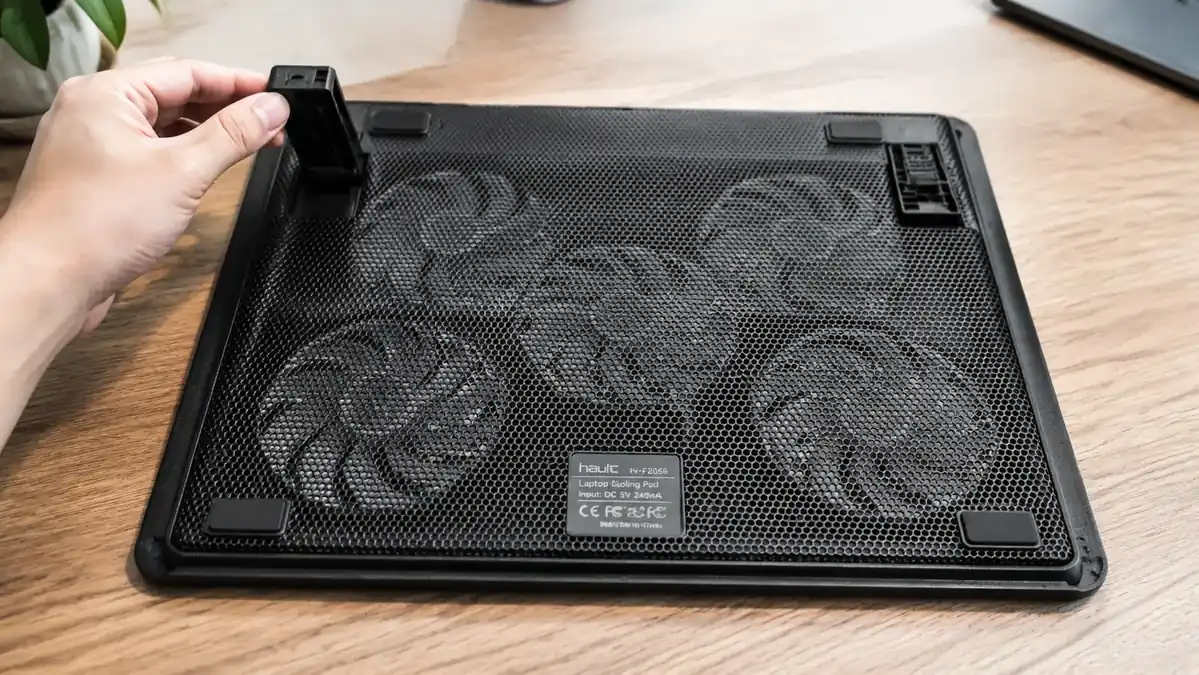
The product photos make this look like it comes with more cable than it does. The USB cord running from the pad to your laptop is short, close to 20 inches, which is fine if your laptop sits directly behind the pad but annoying if you like to angle your laptop or use it on a larger desk where the USB port is further away. I ended up buying a 3-foot USB extension separately because the stock cable kept my laptop pinned closer to the edge of the table than I wanted.
Nobody mentions the weight distribution issue either. With a laptop under 4 pounds, the pad sits flat and stable. Mine weighs closer to 5.5 pounds with the charger brick resting on top of it during calls, and on the highest of the two stand positions, I've had it tip slightly backward twice when I leaned the laptop screen too far back. It's not a dangerous wobble, just enough that I now keep the lower stand position as my default and only use the higher angle when I remember to check the balance first.
The other thing nobody puts in the bullet points: the mesh surface picks up static in dry winter air. Twice in January I felt a small static shock when sliding my laptop off the pad after a few hours of use. It's a minor annoyance, not a defect, but it caught me off guard the first time and I wish someone had warned me. There's also no carrying pouch or sleeve included, despite how the product photos are framed to make it look travel-ready. If you're planning to move it between locations regularly, budget for a slim sleeve or just accept some scuffing on the mesh over time.
The Noise Situation, Without the Spin
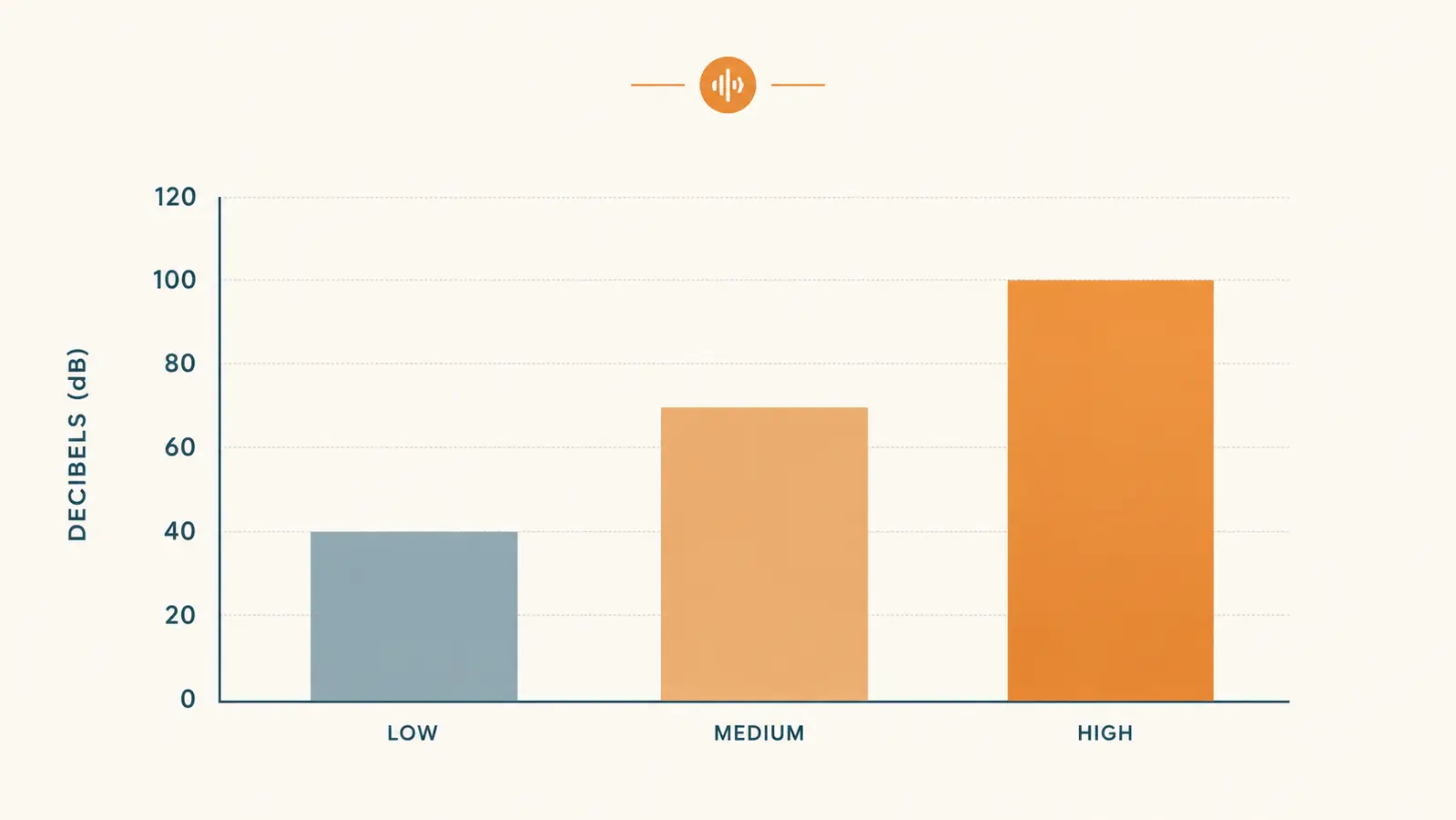
Fan noise is where I think most reviews get generous. On low, it's genuinely quiet, close to silent unless you put your ear near the grille. Medium introduces a soft hum that's easy to tune out within a few minutes. High is where the honesty matters: it's loud enough that on a sensitive microphone setting, someone on the other end of a call has asked twice if I was running a fan or an air purifier nearby. I measured it roughly with a decibel meter app on my phone, not lab-grade equipment, but good enough to see the pattern in the chart above. Low sat around 32 decibels, medium around 38, and high climbed to somewhere near 46, loud enough to notice in a quiet room, though nowhere near disruptive if you're the only one home.
What nobody tells you is that the pitch changes slightly as the fans age. At the six-month mark, I noticed a faintly higher-pitched whine on the high setting that wasn't there in month one. It hasn't gotten worse since, and it's not audible on calls, but it's there if you're listening for it. I'd call it normal wear, not a defect, but I'd rather flag it than pretend the fans sound exactly the same a year in as they did on day one.
I also tested it side by side with my old ThinkPad's internal fan running flat out with nothing under it, just to have a fair comparison point. The internal fan alone, straining under a heavy load, was actually louder and harsher sounding than the Havit on its highest setting. That surprised me. A laptop working hard to cool itself with undersized internal fans tends to sound more strained and whiny than three larger external fans moving the same amount of air. It's not a perfectly clean comparison, but it reframed how I think about the noise tradeoff. You're often trading one kind of fan noise for a different, steadier kind.
Temperature Relief: The Number That Actually Matters
Before the pad, my ThinkPad idled around 55 degrees Celsius and climbed to the high 80s during anything demanding, video calls with screen share, spreadsheet macros, the occasional render job for a client deck. That's uncomfortably close to where thermal throttling kicks in on this particular chip, and I noticed it as stutter in the trackpad and a half-second lag opening new windows during long calls.
With the Havit running on medium, that same workload tops out in the mid to high 70s instead of the high 80s. On high, I've gotten it down into the low 70s during the worst summer afternoons in the garage. That's a real, repeatable difference, not a placebo. But I want to be direct about the limits: on the hottest days, when the room itself is pushing 82 degrees Fahrenheit ambient, the gains shrink to maybe half of what they are on a comfortable 70-degree day. A fan can only move the air that's available. It can't manufacture cold air out of a hot room, and I'd be lying if I said otherwise.
Build Quality After a Full Year
The mesh has held up better than I expected given the tea incident and the general abuse of a working garage office. There's a slight burnish where the laptop's rubber feet rest, purely cosmetic. The fan housings collect dust fast in my space, more than I anticipated, and I've had to blow them out with compressed air every six to eight weeks rather than the twice-a-year I was hoping for. That's more maintenance than the listing implies, though it takes two minutes once you build the habit.
The USB pass-through ports on the side are the weakest link, and I say that having read other owners complain about the exact same thing before I bought it, so it's not a fluke. My wireless mouse dongle disconnects from the pass-through port every so often, maybe once every couple of weeks, always for a second or two, always resolved by unplugging and replugging. I moved the dongle to a direct laptop port months ago and haven't thought about it since. If you were planning to rely on those pass-through ports for anything you need rock solid, don't.
One thing worth noting for anyone comparing prices across sellers: I checked the listing again recently and the current price is close to what I paid in March, which tells me this hasn't been quietly discounted because of a known issue or a refresh coming down the pipe. It's priced the same because it's still doing the same job for new buyers that it did for me.
Compared to the two pads that died on me before this one, the difference isn't in peak performance, it's in consistency over time. Both of my previous pads cooled well for the first few weeks and then started losing power output, one developed a rattle that got progressively worse, the other simply stopped spinning one fan out of three without warning. A year into this one, all three fans still spin at full strength on every setting, and I haven't heard a single rattle. That kind of boring reliability doesn't show up in a first-week review, but it's the whole reason I'm writing this one now instead of a refund request.
What I Liked
- Real, repeatable 12 to 15 degree Celsius drop under sustained work load
- Survived a genuine liquid spill and a year of daily use without failing
- Low and medium fan settings are quiet enough to forget about
- Lightweight enough to travel without a second thought
- Grips laminate and wood desk surfaces equally well
Where It Falls Short
- Short stock USB cable limits desk layout flexibility
- Weight balance gets tippy on the higher stand angle with heavier laptops
- USB pass-through ports occasionally drop peripheral connections
- High fan setting is noticeable enough to draw comments on calls
- No carrying sleeve included despite travel-friendly marketing
It's not magic. It's a fan doing exactly what a fan does, and after a year of abuse, mine is still doing it.
Who This Is For
If you work from a room without reliable climate control, run a laptop with any kind of discrete graphics or heavier processor, or you've already noticed your fan running louder and more often than it used to, this is a sensible, low-cost move. It's also worth it for anyone who travels between workspaces, a kitchen table some days, a home office the rest, since it packs flat and adds almost no weight to a bag. If you've already burned through a couple of cheaper pads like I had, treat this as the one worth actually keeping.
Who Should Skip It
If your current laptop already runs cool and quiet, plenty of newer ultrabooks genuinely do, you're not going to notice enough difference to justify the desk space. Anyone recording audio in a silent room should also think twice, even the low setting introduces a faint hum a sensitive microphone will pick up. And if you need a taller, more adjustable stand for ergonomic reasons, this two-position flip stand is more basic than what dedicated stands offer. It's also not the right pick if you need a built-in carrying case or plan to lean hard on those USB pass-through ports for anything mission critical.
A year of daily abuse later, it's still the fan I reach for.
If your laptop is running hotter than it should, this is a cheap way to test whether a cooling pad actually solves it before spending more on something fancier. Check today's price on Amazon.
Amazon Check Today's Price on Amazon →