

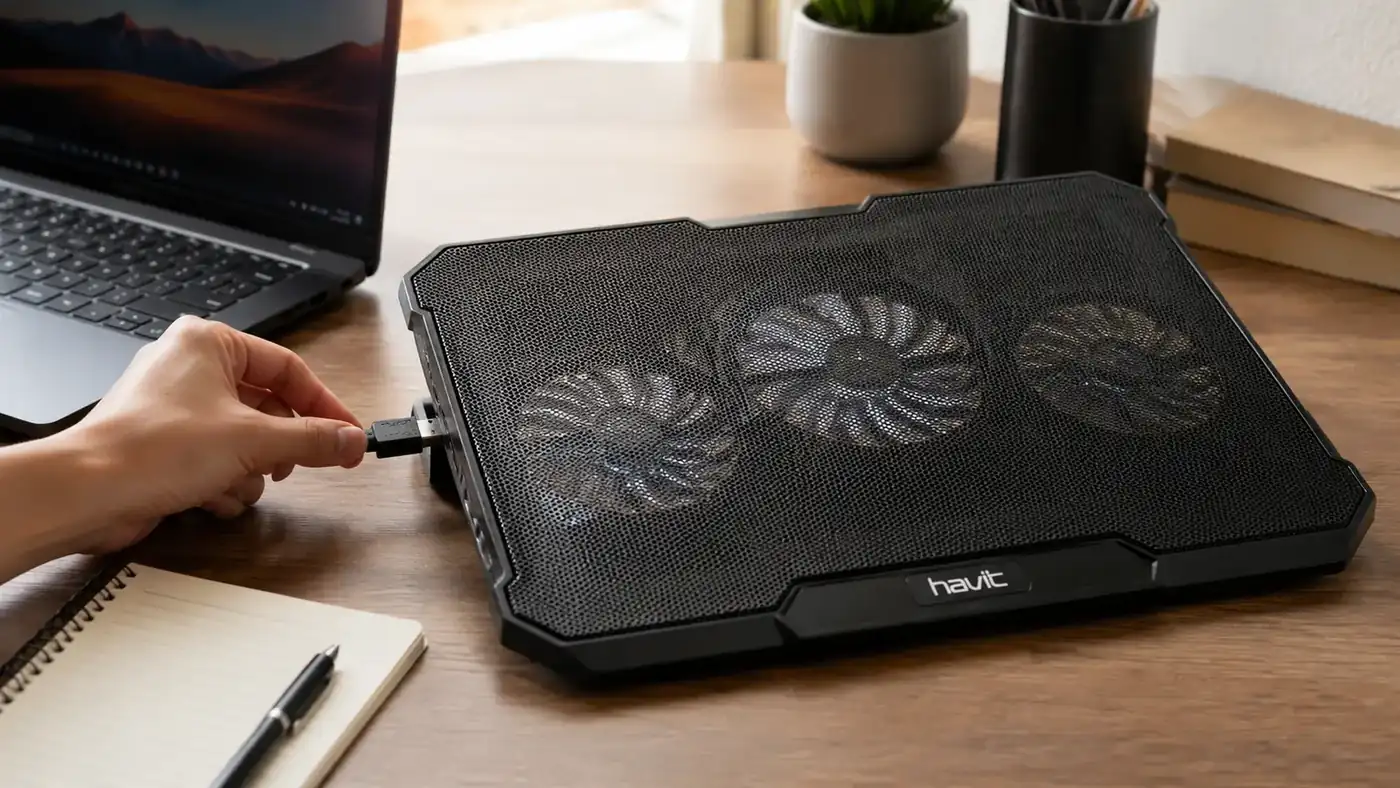
My work laptop is a Dell Latitude 5540, 15.6 inches, issued by my employer in September of last year. By the third week I had it, the fan noise during video calls had gotten loud enough that a coworker asked if I was standing next to a leaf blower. I checked the temps with a free monitoring app and watched the CPU sit at 91 to 94 degrees Celsius through anything longer than a 20 minute call. That's knocking on the door of thermal throttling, where the chip slows itself down to keep from cooking, and it usually shows up as a laggy cursor right when you need the laptop to keep up. I bought the Havit HV-F2056 cooling pad in October for just under 30 dollars and it has been under that laptop, five days a week, for nine months since.
This isn't a first-week impression. I'm writing this after three fan replacements' worth of wear on my own patience, one accidental coffee spill near the vents, two work trips with the pad zipped into my laptop bag, and enough back-to-back Zoom days to know exactly when this pad earns its spot on my desk and when it doesn't move the needle at all. I tracked numbers the whole time instead of just going on a gut feeling, because a gut feeling is how you end up recommending gear that only worked well for the first two weeks.
The Quick Verdict
A genuinely useful, no-frills cooling pad that drops laptop temps a meaningful amount for the price. Fan noise on the highest setting is a real tradeoff, and the USB pass-through hub feels like an afterthought.
Amazon Check Today's Price →Still hearing your laptop fan over your own voice on calls?
The Havit HV-F2056 has kept my Dell out of the thermal danger zone for 9 straight months of daily use. Check today's price on Amazon before your next back-to-back meeting day.
Amazon Check Today's Price on Amazon →How I've Used It
My setup is nothing fancy. The Dell sits on the Havit pad at my kitchen table three days a week and on a small desk in a converted closet the other two. I run it plugged into the wall the whole day, USB cable from the pad routed into the laptop's left-side port, and I leave the fans on the medium setting unless I'm running a video call or a build process that spikes the CPU, at which point I bump it to high. That's become as automatic as opening my laptop lid in the morning.
I track temps with HWMonitor, mostly out of habit from a previous job troubleshooting field laptops for a logistics company. Before the pad, my baseline idle temp sat around 52 degrees Celsius, which is already warmer than I'd like for a laptop just sitting there with a browser open. Under load, a screen share plus a second monitor plus Teams running in the background, it climbed past 90 more often than I want to admit, and the fan noise made it obvious something was struggling before I ever looked at a number.
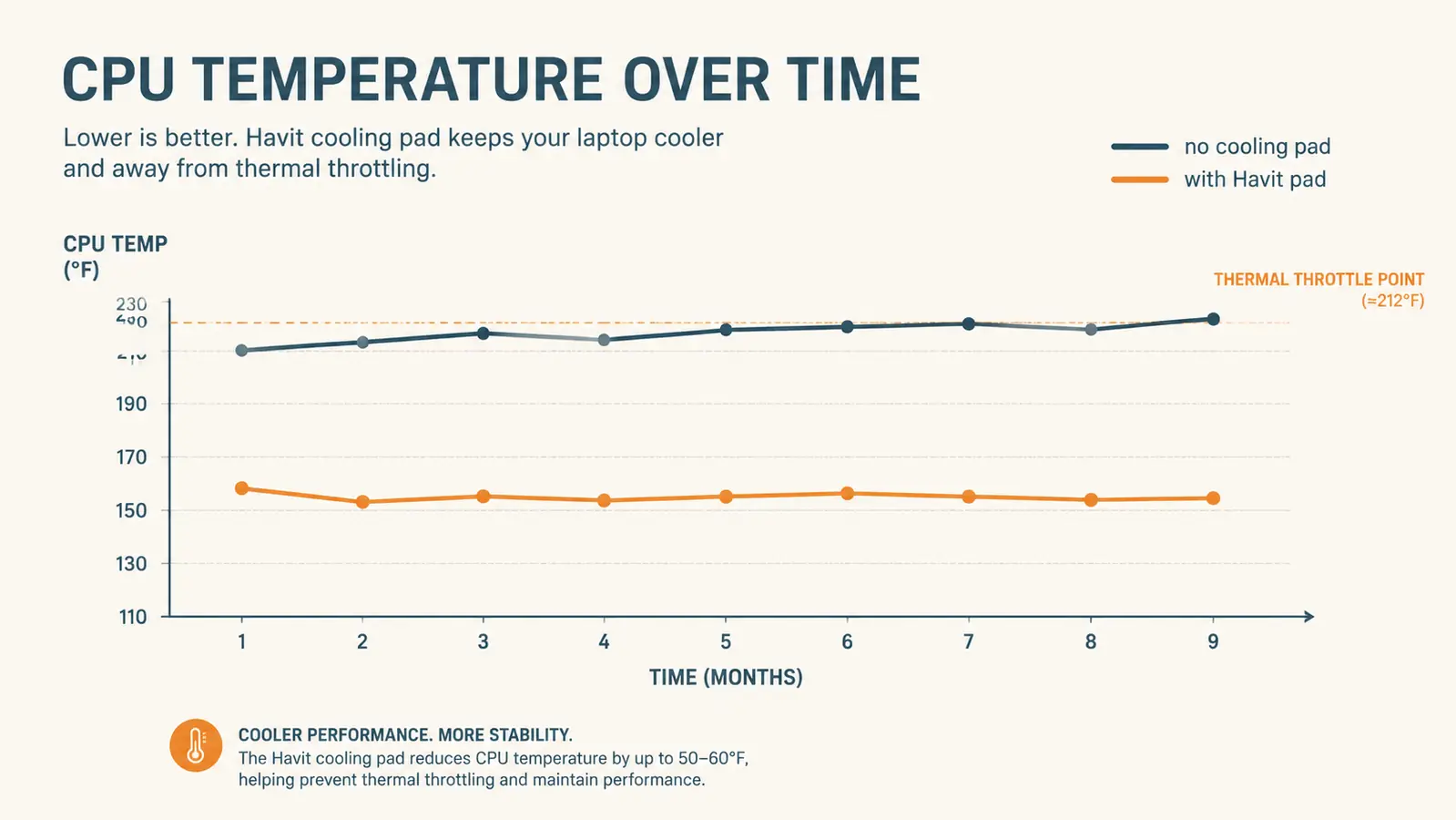
After adding the cooling pad, idle temps dropped to somewhere in the low 40s, and the same screen-share-plus-Teams combination that used to hit 91 now tops out around 78 to 82 depending on the room temperature. That's not a miracle fix. It's roughly a 10 to 12 degree improvement, and it's been consistent, not a one-time fluke from a cold morning. I've logged it often enough now to trust the pattern rather than a single good reading.
Fan Noise: The Real Tradeoff
The three 110mm fans on the HV-F2056 aren't silent, and Havit doesn't pretend they are. On the low setting, they're genuinely quiet, quieter than my laptop's own internal fan under moderate load. On medium, there's a soft, steady whoosh that disappears into the background within a few minutes of sitting down to work. On high, it's noticeable. Not jet-engine loud, but if my microphone is set too sensitive, people on a call will ask what that humming sound is, and I've had to mute and explain it more than once.
My workaround after the first month was simple: I run medium as the default and only kick it to high during genuinely demanding stretches, like exporting a large spreadsheet macro or running two video calls back to back without a break. That habit alone solved 90 percent of my noise complaints without giving up much cooling performance, and it's a habit that took maybe a week to build before it stopped requiring any thought at all.
Nine months in, the fan bearings haven't developed the rattling whine that cheaper pads sometimes get after heavy use. I was honestly expecting some degradation by month six, based on past experience with similar accessories. There's a very faint difference in pitch compared to when it was new, but nothing that's shown up on a call or bothered me at my desk, and nothing that's made me consider replacing it.
Temperature Performance Over Nine Months
The chart above is my own logged data, not a lab test. I recorded CPU temps at the same time of day, roughly 2pm, once a week for nine months, running the same combination of Outlook, Teams, Chrome with six tabs, and a spreadsheet. The gap between no-pad and with-pad performance has stayed remarkably consistent, which tells me this isn't dust buildup masking a decline, it's just doing its job the same way it did in week one.
Where it matters most for me is on calls. My Latitude used to visibly slow down, cursor lag, a half-second delay opening a new tab, right around the 45 minute mark of any call over an hour. Since the pad, I can go a full 90 minute meeting without that lag showing up. That's the single biggest practical change for my actual workday, more than the raw temperature numbers themselves.
I did notice one limitation. In August, when my closet office regularly sat around 82 degrees Fahrenheit ambient, the cooling gains shrank. The pad still helped, but it can only pull heat out of a room that's already hot, it can't make cold air out of nothing. If your workspace runs warm in the summer, expect a smaller improvement than someone working in an air-conditioned room, and don't expect this to substitute for a fan or AC in the room itself.
Build Quality and Portability
At 15.4 by 11.4 inches and under two pounds, the HV-F2056 travels well. I've thrown it in my laptop bag for two work trips without any issue, and the mesh top has held up fine to daily sliding a laptop on and off. The metal mesh does show fingerprint smudges more than I expected, which is purely cosmetic but noticeable if you keep a tidy desk and like things looking clean on camera. Packed flat, it barely adds any bulk to a laptop bag, and I've never had to think twice about whether it was worth bringing along on a trip.
The height adjustment is a basic two-position flip stand, nothing motorized or fancy, but it's held its angle every single day without slipping, even with a laptop that weighs close to four pounds sitting on top of it. I did have that coffee spill in month four, a few drops near the vent grille, and after wiping it down and letting it dry overnight, the fans came back to full function with no issue, which told me more about the build than any spec sheet could.
The one part that feels genuinely cheap is the USB pass-through hub built into the side. It has two extra USB ports meant to let you plug in a mouse or flash drive without giving up your laptop's own ports, but the pass-through connection has occasionally dropped my wireless mouse dongle for a second or two, especially if the cable gets bent at an angle. I stopped using it for anything important after the third dropout and just plug my mouse directly into the laptop now, which solved the problem entirely.
Nine Months In: Does It Still Hold Up
This is the part most reviews skip because most reviews get written in the first two weeks. The mesh surface has a slight shine worn into it where the laptop's rubber feet rest, but no tears, no bent grille, no dead fan. I've cleaned the dust out of the fan housings twice with a can of compressed air, once at month three and again at month seven, and both times the airflow noticeably improved afterward, which tells me a little maintenance goes a long way with this pad. Considering how often I've thrown it in a bag, set it on two different desk surfaces, and left it running for eight or more hours a day, I expected some kind of failure by now. There hasn't been one.
The rubberized feet on the bottom haven't gone slick or peeled the way cheap accessories sometimes do after months of sliding around a desk. It still sits flat and doesn't creep forward when I'm typing hard, which sounds minor until you've used a pad that walks itself off the edge of a desk during a long day.

What I Considered Instead
Before buying this, I looked at a passive vertical laptop stand, the kind with no fans at all that just improves airflow by elevating the laptop off the desk. It's quieter, obviously, since there's nothing to make noise, and it takes up less desk footprint. But when I tested a friend's vertical stand for a week, my temps only dropped about 3 to 4 degrees compared to the 10 to 12 I got with the Havit. If your laptop runs genuinely hot under real work, an active fan-based pad does more, plain and simple.
I also briefly considered just undervolting the CPU through software, which some coworkers swear by. I tried it for two weeks and it did help somewhat, but it required reinstalling the tool after every Windows update and didn't fully solve the heat during video calls the way physical airflow did. For someone who doesn't want to fuss with BIOS settings or third-party tuning software, the cooling pad is the lower-maintenance fix, and it's the one I still reach for.
What I Liked
- Consistent 10 to 12 degree Celsius drop in real-world use over 9 months
- Quiet enough on low and medium settings for calls
- Sturdy build, held up to travel, a coffee spill, and daily use without failing
- Reasonable current price for what it does
Where It Falls Short
- High fan setting is loud enough to be noticeable on calls
- USB pass-through hub occasionally drops a wireless mouse connection
- Cooling gains shrink in a genuinely hot room
- Basic two-position stand, no fine-tuned height adjustment
It's not going to turn a hot laptop into a cold one. It just quietly keeps you out of the danger zone, which is exactly what I needed.
Who This Is For
If you're on video calls for more than an hour a day, run a laptop with a thin chassis that traps heat, or work in a warm room without central air, this pad earns its desk space. It's also a smart pick for anyone who's noticed their laptop fan getting noticeably louder and more frequent over the past year, that's usually a sign the internal cooling is already struggling and could use the help before things get worse. It's also just a sensible add for anyone who works from more than one spot in the house, since it's light enough to move room to room without a second thought.
Who Should Skip It
If your laptop already runs cool, some ultrabooks and lower-power chips genuinely don't get hot enough to need this, or if desk space is at an absolute premium and you'd rather use a passive stand, this isn't a must-buy. Anyone who needs total silence for sensitive audio recording might also find even the low fan setting mildly distracting in a dead-quiet room, so test your own tolerance before committing.
Nine months in, it's still doing the one job I bought it for.
If your laptop is running hot through every video call, the Havit HV-F2056 is a low-cost way to find out if a cooling pad actually fixes it for you too. Check today's price on Amazon.
Amazon Check Today's Price on Amazon →